
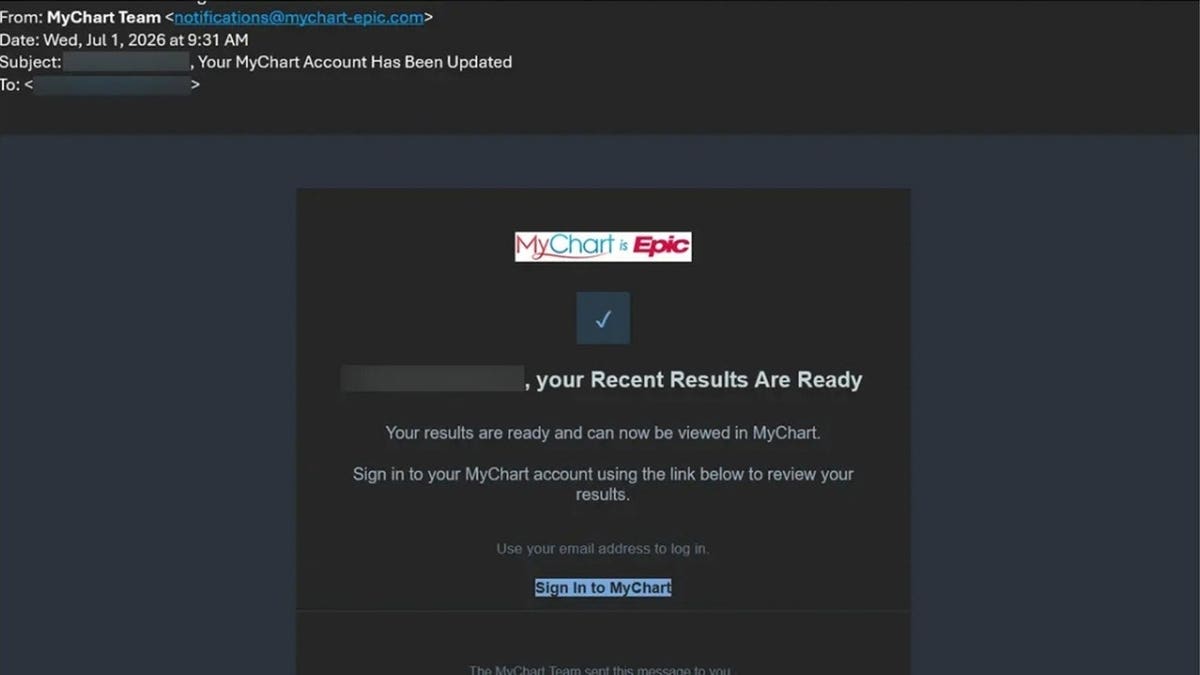
MyChart, a widely used patient portal developed by Epic, grants hospitals and medical practices the ability to offer online access to health information and communication with care teams. Mary M. recently shared her concerns about moving more patient communications online, worried about scams targeting MyChart users. Though phishing scams mimic MyChart, they do not imply a breach of the platform itself.
Recognizing MyChart Phishing Scams
Scammers have developed fake MyChart experiences to deceive users into sharing sensitive information. These include phishing emails featuring fake medical results and Medicare offers. The scammers’ tactics involve imitation of the MyChart site design and attempts to deliver malware onto Windows computers.
Epic Systems Corporation has identified scams exploiting the MyChart interface to capture login details and potentially install malware.
How Scams Are Carried Out
These campaigns often start with an ordinary-looking message claiming “Your recent results are ready.” Recipients are led to a fake login page that appears credible due to copied code from the genuine MyChart site. Once login details are entered, scammers gain access. One scenario involves displaying false medical records, using tactics such as “AI-powered reviews” to induce panic and pressure targets into further interactions, like running potentially harmful commands.
Protect Yourself from MyChart Phishing
- Open MyChart directly through the app or official healthcare provider’s website.
- Avoid using in-message links; manually navigate to secure access points.
- Never run computer commands as directed by a suspicious message.
- Implement two-step verification to add a layer of security.
- Use dedicated passwords for sensitive accounts like MyChart.
- Maintain updated security measures and antivirus software to safeguard your devices.
- Verify alarming medical claims with your healthcare provider personally.
- Use data removal services to limit available personal information for scammers.
- Suspect any supposed MyChart giveaways, and avoid sharing personal or payment details.
Responding to a Fake Link
If you’ve interacted with a fraudulent site, your response should be based on your actions:
- If you simply clicked a suspicious link, close the page and mark the email as junk without clicking further links.
- Upon entering MyChart login information, change your password immediately through the official app.
- If financial details were submitted, contact your bank or card issuer promptly.
- Running commands or downloading files requires immediate disconnection and a full security check before further use.
Acknowledging Real versus Fake Messages
MyChart-related emails should trigger thoughtful responses rather than rushed actions. Scammers often exploit the fact that patients expect electronic communications about health updates.
To stay proactive, incorporate safeguards like opening portals independently and verifying scary claims through trusted sources. Organizations like Epic provide guidelines to help differentiate between legitimate messages and scams.