
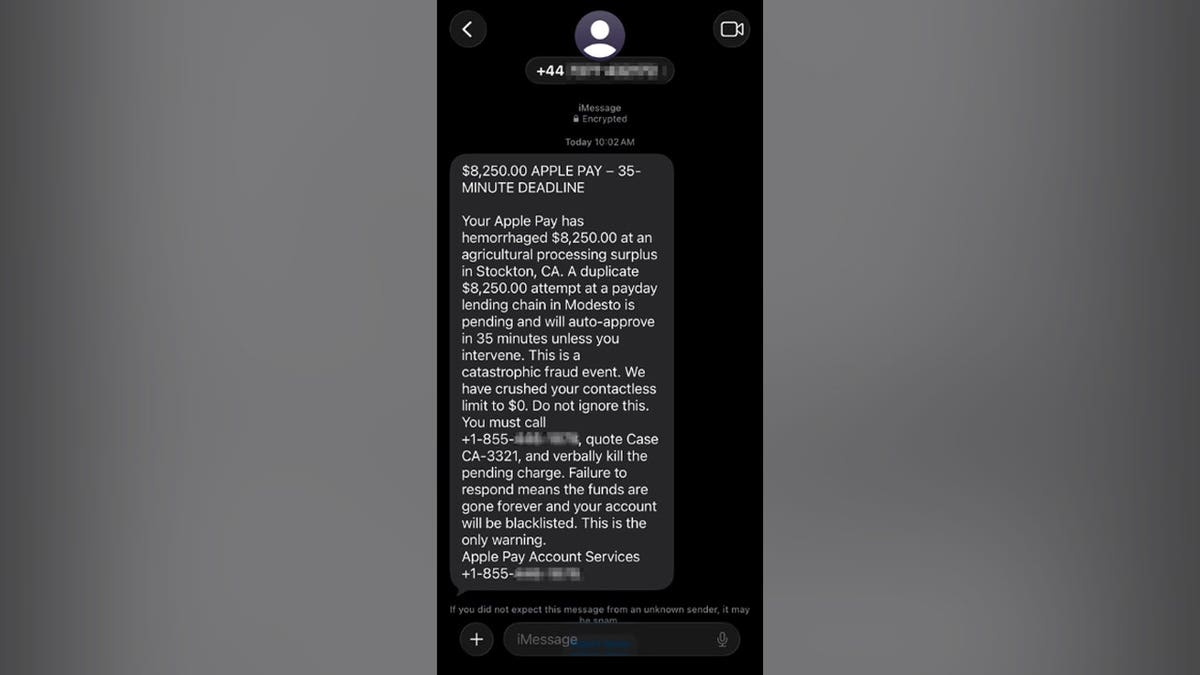
An alarming text message received by Paul C. in Washington, D.C. claimed he had already been charged $8,250 through Apple Pay and that another $8,250 would be charged imminently. This type of message is designed to instill panic before critical thinking can set in. Instead of responding immediately, Paul did the right thing. He paused, ignored the callback number, and shared the message for analysis.
Key Warning Signs in the Apple Pay Scam
The scam text message received by Paul had several red flags:
- Mismatch between sender and callback number: The text came from a +44 number with a callback to a separate 855 toll-free number, a potential sign of fraud.
- Use of Apple Pay branding: The message leveraged Apple’s name to appear official, yet did not provide specific banking details.
- High charge amounts and countdown: Mentioning $8,250 with a 35-minute deadline heightened anxiety, discouraging careful verification.
- Dramatic language: Phrases like “hemorrhaged money” and “verbally kill the pending charge” deviated from typical financial terminology.
- Vague merchant descriptions: Transactions were supposedly from unspecified businesses in real cities.
- Contradictory payment story: Statements about blocked contactless activity contradict pending charges.
- Focus on calling the scammer: Encouraging contact via the provided number rather than verified channels.
How Apple Pay Callback Scams Operate
The text serves as bait, inducing recipients to call the scammer, giving them control of the interaction. Scammers could trick callers into sharing personal information under the guise of canceling charges, or even install remote-access apps for further exploitation.
Verifying Apple Pay Charges
Avoid calling numbers in suspicious texts. Instead, verify through trusted channels:
- Check recent transactions in the Wallet app on your iPhone.
- Use your bank’s official app for the full account history.
- Contact your bank directly using the number on your card.
Reporting Fake Apple Pay Texts
To report such texts:
- Save a screenshot with sender information.
- Report spam on your device.
- Email screenshots to [email protected].
- Forward texts to 7726 (SPAM).
- File a report at ReportFraud.ftc.gov.
Responding If You’ve Called
If you called the scam number, take immediate steps based on the information shared:
- If you provided card details: Contact your bank using official channels.
- If you shared an Apple account password: Change it promptly and review account settings.
- If you gave out verification codes: Notify the relevant company right away.
- If remote-access software was installed: Disconnect from the internet, remove the software, and run a security scan.
Preventing Similar Scam Texts
Protect yourself with these steps:
- Slow down and verify warnings independently.
- Never provide security codes or allow remote access based on unexpected prompts.
- Utilize strong security software on your devices to recognize potential scam links.
- Reduce available personal data on broker sites to limit scammer knowledge.
- Consider enhanced identity and credit monitoring after exposure to scams.
If you’ve encountered other convincing scams or wish to share your experiences, contact us at CyberGuy.com.