
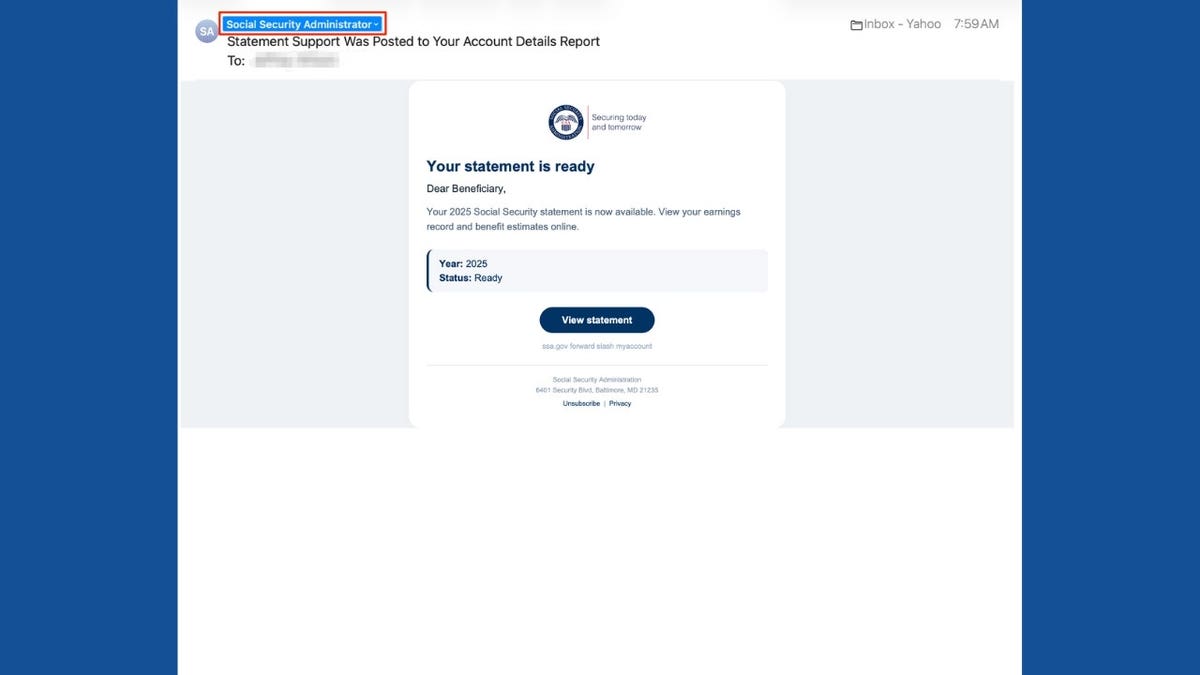
The influx of emails from what appears to be the Social Security Administration (SSA) can certainly catch your attention. These emails usually concern your retirement benefits and lifetime earnings, presenting a message suggesting your statement is ready for viewing. While clicking the button might seem sensible, scammers are banking on that very reaction.
Take a look at emails formatted with the SSA logo and incorporating links to your statement. Although they look official, the sender’s email often has no relation to the government. The email might seem credible at first glance, but under closer inspection, you’ll notice red flags.
The Social Security Administration’s Office of the Inspector General noted a rise in fraudulent emails like this one in February 2026. Identifying these scams helps protect your information from being compromised.
How This Scam Operates
The email claims to be from a “Social Security Administrator” and invites you to review your 2025 Social Security statement—complete with a box formatted to look professional, showing data as “ready” for viewing. This deceptive tactic mimics legitimate government notifications.
However, issues arise when you scrutinize the sender’s email domain, which often does not end in .gov. Instead, it might use a domain like loradmiadministraciones.com, which isn’t affiliated with the government. Scammers use display name trickery to mimic legitimate organizations.
The SSA typically sends emails from their official addresses, occasionally utilizing certain outside services. Always verify unexpected emails by inspecting the sender’s complete address.
Concerns with Phishing Links
The “View statement” button in such emails can redirect you to fraudulent sites crafted to capture sensitive information or introduce malware. Though the link destination hasn’t been verified, it’s vital not to trust the sender’s email address due to its resemblance to known phishing tactics.
The email’s plausible nature stems from offering statement visibility without aggressive pressure on recipients, like threats of benefit loss. The professional presentation, including the SSA logo, enhances this facade.
Legitimate Social Security Emails
The SSA does send authentic emails, typically reminding you to review your Social Security account annually before your birthday. Scammers exploit these legitimate practices, crafting emails that seem genuine.
Steps to Verify Authenticity
- Inspect the sender’s full email address; look for unrelated domains.
- Hover over email links to preview their actual destination. Exercise caution.
- To confirm a message’s legitimacy, access the SSA website directly or call them.
Safety Tips
- Access Social Security information via ssa.gov, not through email links.
- Secure your account with strong authentication methods.
- Utilize reliable antivirus software; keep systems updated.
- Exercise caution with your Social Security number; use official SSA channels for sensitive exchanges.
- Regularly monitor your Social Security records for unexpected changes.
- Reduce information visibility on data broker websites.
- Report any suspicious emails using email providers’ phishing features before deletion.
Reacting to Potential Compromise
- If you clicked but didn’t share info, close the suspect site and run security checks.
- If you entered a password, change it immediately across affected accounts.
- Sharing your Social Security number warrants checking IdentityTheft.gov for recovery resources and implementing credit freezes.
- Accidentally downloading malicious files calls for internet disconnection and antivirus scans.
- Financial compromise involves contacting banks and authorities like the FBI and FTC.
What makes this scam subtly effective is its resemblance to typical SSA communications without alarming demands. Always ascertain the sender’s authenticity, granting you protection against possible cyber threats.
For those who receive dubious emails, visit CyberGuy.com for more tech insights and protective measures. Your vigilance can prevent potential headaches.