
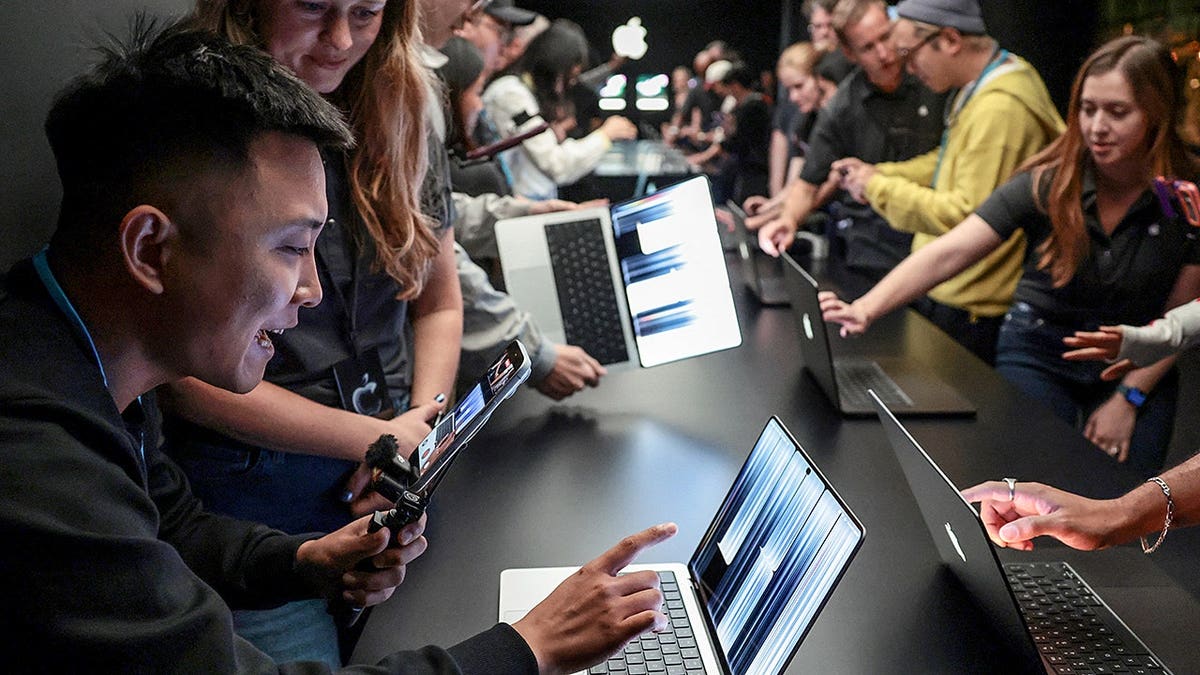
People are eager to try out the new MacBook Pro with a touchscreen after Apple CEO John Ternus unveiled it in Los Angeles on October 28, 2026. This laptop fulfills the long-standing desire among users for a touch interface on a MacBook.
The new MacBook Pro also features an OLED display, a slimmer design, and robust processing capabilities. However, its cost, starting at $2,899, makes it an expensive purchase. Let’s explore what this new offering includes and who might find it most beneficial.
Touchscreen MacBook Pro
For many years, Apple stood by its belief that the Mac utilized a keyboard and trackpad most effectively. On the contrary, Windows laptops have featured touchscreens for quite some time. Apple’s introduction of the Touch Bar was an attempt to add touch elements, but it did not replace the traditional experience. The new MacBook Pro with its PROLED XDR display now allows direct interaction with the screen, mimicking gestures familiar from the iPhone and iPad. This innovation includes a redesigned hinge, providing stability as you touch the screen, preventing wobbling during interaction.
This evolution does not transform the MacBook Pro into a tablet and it remains incompatible with the Apple Pencil. The keyboard and trackpad still play essential roles for most tasks. While this might disappoint those wanting a unified device, the notable improvements help enhance the overall experience.
OLED Display Enhancements
The spotlight is on the touchscreen, yet the new display technology’s impact could be even more substantial. Named the PROLED XDR display, it utilizes tandem OLED technology. Unlike traditional screens that need a backlight, each pixel in an OLED display produces its own light. This technology allows for richer blacks and brighter highlights.
Apple claims this display reaches up to 2,000 nits in peak brightness for HDR and SDR content. With a contrast ratio of 10,000,000:1 and refresh rates of up to 120Hz, the display aims to deliver vivid visuals. Photos will seem more vibrant and movies can reveal more details in shadowy scenes. Artists and video editors will appreciate the enhanced color accuracy.
An antireflective coating minimizes glare, and an optional nano-texture finish further controls reflections for those in bright environments. These display improvements could outweigh the benefits of touchscreens alone, especially for professionals working long hours on a laptop.
Performance and Specifications
Performance is uncompromised in this model. Equipped with either an M5 Pro or M5 Max processor, the touchscreen MacBook Pro targets users needing more power than typical laptops provide. Heavy-duty tasks like editing high-resolution videos or managing large photo libraries are well within its capabilities. Configurations offering up to 128GB of unified memory and 16TB of storage cater to demanding users, although they significantly raise the price.
This model also runs on macOS 27, featuring Apple Intelligence, and introduces Dynamic Island to the Mac for real-time updates. Video calls benefit from a 12-megapixel Center Stage camera, while the audio system boasts an improved six-speaker setup. Connectivity includes Thunderbolt 5 and an HDMI port for external devices.
Pricing and Models
The touchscreen MacBook Pro sits firmly at the high end of the market, with the 14-inch model starting at $2,899 and the 16-inch at $3,399. Opting for the more powerful M5 Max processor results in a further price increase. In contrast, Apple also released a different 14-inch model with the new M6 chip, starting at $1,999. However, it lacks touch support, underscoring a $900 difference from the entry-level touchscreen variant.
The previous 14-inch MacBook Pro equipped with the M5 Pro chip started at $2,499, $400 less than the new touchscreen iteration, providing customers with a significant choice between configurations.
Touch Integration with Apps
Apple indicates that many current Mac apps will seamlessly accommodate touch input by translating finger taps into mouse clicks within macOS. This makes basic interactions intuitive, setting the stage for more integration from developers. Apple’s goal is evident in applications like Final Cut Pro, where touch allows direct manipulation of media, and Logic Pro, which lets musicians interact with virtual instruments.
Apps from third parties, including Adobe Lightroom and Microsoft Office, are expected to utilize these new features. While enticing, not all apps will automatically become easier to use with touch due to potentially small interfaces.
Should You Upgrade?
The decision to upgrade hinges on usage. Those using recent MacBook Pro models that meet current needs may not rush to change solely for the touchscreen. A mouse or trackpad remains a suitable input method, especially for precision tasks. However, professionals dealing heavily with video and photo editing may find valuable advantages in the OLED display’s superior visuals. For daily activities like browsing and emailing, alternatives like the MacBook Air might suffice.
For those contemplating an upgrade, trying the new MacBook Pro in-store when it becomes available on November 6 is recommended. Hands-on experience could offer more insight than technical specifications alone.
Security and Protection
Investing nearly $3,000 calls for robust security measures. While macOS provides inherent security, threats still exist. Keeping your system updated and employing strong antivirus software is advisable. This proactive stance helps avert possible malware infections and risky online interactions.
For comprehensive guidance on the best antivirus solutions for various devices, visit CyberGuy.com.
Kurt’s Insights
The MacBook Pro’s addition of a touchscreen is a long-awaited step. Coupled with the advanced OLED display, the offering is appealing, particularly for those working with visual content. However, the high price compared to other options poses a significant question. Buyers should evaluate the utility of the touch feature and consider experiencing it firsthand before committing.